How to build a Telegram Mini App
Telegram mini apps are a popular way to onboard users to blockchain apps though a platform they are already familiar with. In short, telegram puts your app in front of more than a billion users without asking any of them to download anything new. Not only that, but with many of the web3 community chats living firmly within the telegram ecosystem, building a mini app is also a great way to reach them.
The hard part of building one is creating a seamless ux that doesn’t lead users away from telegram.
That’s why this guide walks through what a Telegram Mini App is, why it's worth building one, and how Reown gives your users a wallet connection and onchain experience that works out of the box, right inside Telegram.
So without further ado, let’s dive into it.
What is a Telegram mini app?
A Telegram Mini App is a web app that runs directly inside the Telegram client. Instead of sending users to a browser or an app store, you host a standard web app and Telegram renders it in an embedded window launched from a bot, a menu button, or a link. To the user it feels native to Telegram; under the hood it's the same HTML, CSS, and JavaScript you'd ship anywhere else.
Because Mini Apps are built with ordinary web technologies, anything you can build for the web you can bring into Telegram, including a full Web3 app. That's what makes them a natural home for onchain experiences: wallet connections, token swaps, and payments all work inside the Mini App window, with Telegram handling the surrounding chrome, identity, and distribution.
How do Telegram Mini Apps work?
Telegram mini apps are essentially web apps surfaced in telegram using Telegram’s embedded WebView. The way users access them is simple: they appear directly in the telegram app in one of two formats; either a full-screen window or a bottom pane inside the chat.
Telegram mini apps use telegram’s APIs to authenticate profiles, send users notifications and allow access to users’ unique IDs. Using these, they can allow in-app purchases either using native telegram payment methods or third party providers—including crypto payment providers.
Importantly for crypto app developers, telegram mini apps can also be blockchain-enabled, allowing you to build fully-fledged decentralized apps or allow for crypto payments and assets.
While blockchain enabled telegram mini apps typically run on TON blockchain, they are also EVM compatible using Tac, an EVM compatible layer-1 blockchain that connects Ethereum apps to the TON and Telegram ecosystems. They are also compatible with Solana when you use a telegram mini app compatible SDK to create the connection—which is exactly what Reown offers.
Why build a Telegram mini app?
The clearest reason is reach. Telegram has a vast, global, crypto-native user base, and Mini Apps let you meet those users where they already are rather than competing for a download. There's no install step, no app store review, and no separate URL to market — a user taps a button in a chat and your app opens.
Distribution inside Telegram also compounds. Mini Apps can be shared in chats and groups, surfaced through bots, and passed between users the same way any other message travels, so growth can come from the network itself rather than paid acquisition alone. For a Web3 product, that combination of a large built-in audience and frictionless sharing is hard to match anywhere else.
The trade-off has always been the onchain layer. A Mini App lives inside Telegram's webview, so the wallet connection flow has to work cleanly in that environment without bouncing the user out to a browser. Get that right and you keep all of Telegram's distribution advantages while delivering a real Web3 experience. That's the gap Reown closes.
Why build a Telegram app using Reown?
Reown is built to handle wallet connections and onchain interactions in exactly the kind of embedded environment a Telegram Mini App runs in. It works with Telegram bots and Mini Apps out of the box, so you get a polished connection flow and a set of onchain features without writing custom wallet logic for the webview.
Access to Features
Building a telegram app with Reown allows you to access Reown’s purpose-built features such as;
- Web3 wallet connections via the WalletConnect network using Sign in with Ethereum (SIWE) or multichain auth (SIWX).
- Email & Social Login lets you enable authentication using non-crypto accounts users already own like Google, Apple, Meta, Github and more.
- Swaps allow your users to perform in-app swaps from one crypto to another.
- Onramp allows your users to buy crypto with fiat currencies such as Euros or Dollars, in-app.
- Transaction History; provides a way for users to see their own transaction history in-app.
- Network Switching; allows users to swap between supported networks seamlessly and at will.
Compatibility with multiple frameworks
With Reown, you can build telegram mini apps using a range of frameworks, including React, Next.js, Vue and Javascript. This allows you to build with whichever framework suits you and launch using Reown’s out-of-the-box capabilities.
How to create a telegram miniapp: A step by step guide
Setup: What you’ll need before building a telegram mini-app
Create a Telegram Bot
The first thing you’ll need to do is set up a Telegram bot to host your Telegram mini-app. Here’s how:
- Navigate to the BotFather Telegram bot. This bot will help you create, fully customize, and configure your new Telegram bot.
- Type /newbot to start the creation process. You’ll be prompted to set a name for your bot—please enter your desired name. (Image A)
- Next, you’ll be asked to set a unique username for the bot. Once you've completed these steps, your new Telegram bot will be ready to use! (Image A)
- Next, enter /mybots and it will show you a list of bots that you created. Select the bot you just created and click on “Edit Bot”. You will now be able to edit the bot’s info such as its description, picture, etc. (Image B)
- Now, go back to the bot menu and click on “Bot Settings”. Click on “Configure Mini App” and enter the URL you want to set for your mini app. In this case, we set it to https://reown-appkit-evm.vercel.app/. (Image C)
- Go back to the bot menu and click on “Menu Button”. You will now be able to set the URL that will be opened when a user clicks on the menu button. After this, you can also the title to be displayed on the button instead of 'Menu’.
- Your Telegram bot is now all set up! When a user opens the bot and clicks on “Open App” or “Menu,” the Telegram mini-app will open with the URL you configured.
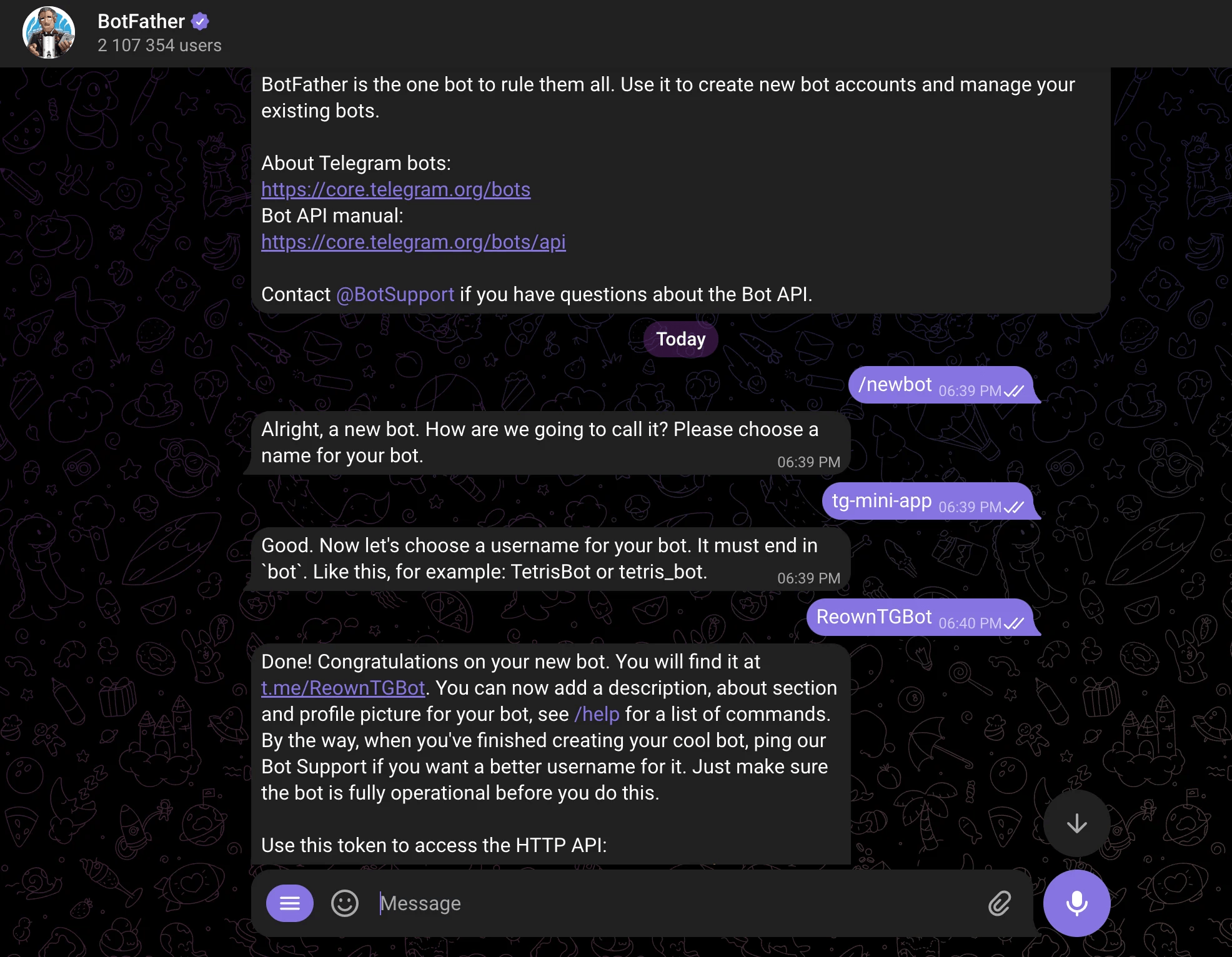
Image A: Steps 2 & 3
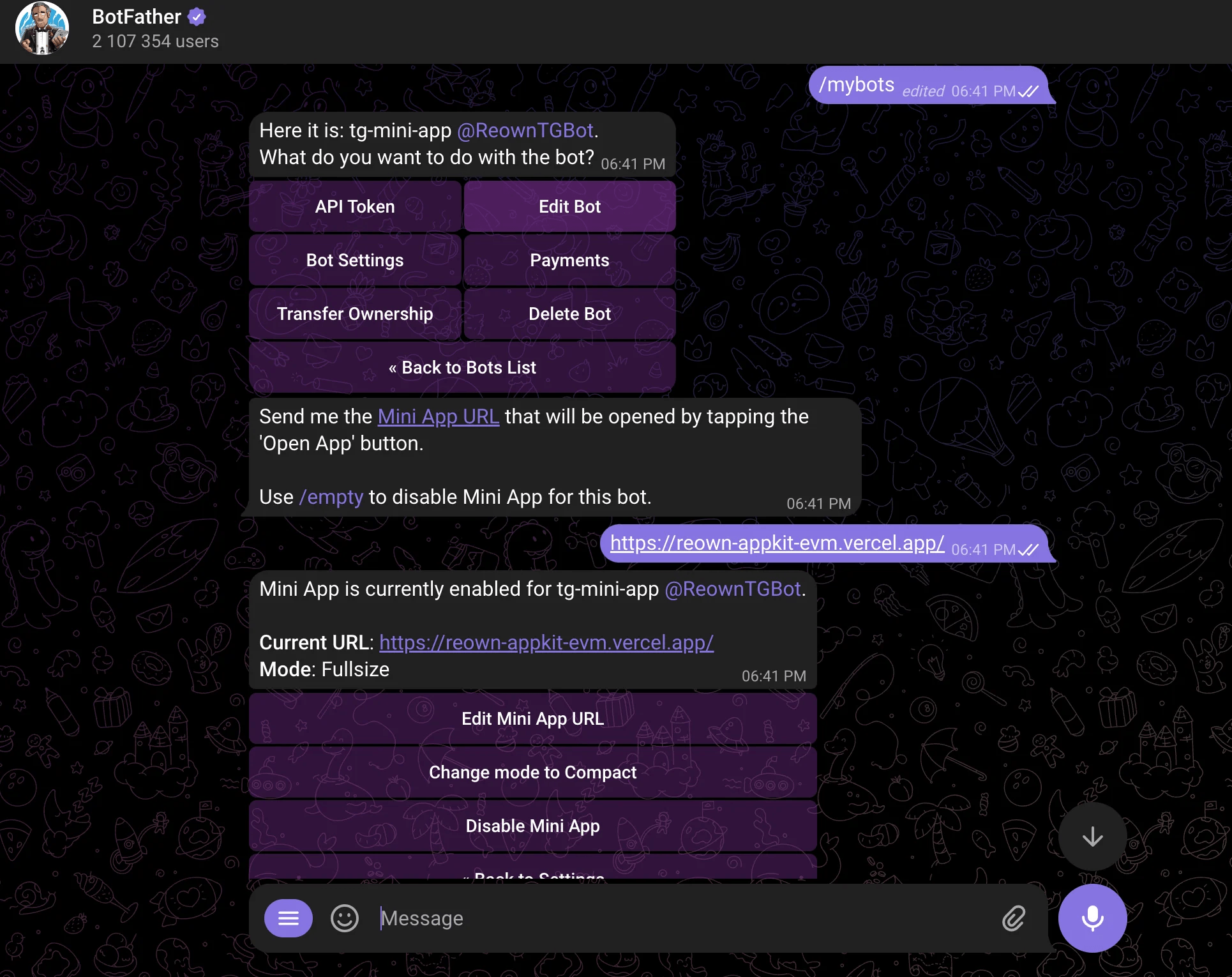
Image B: Step 4
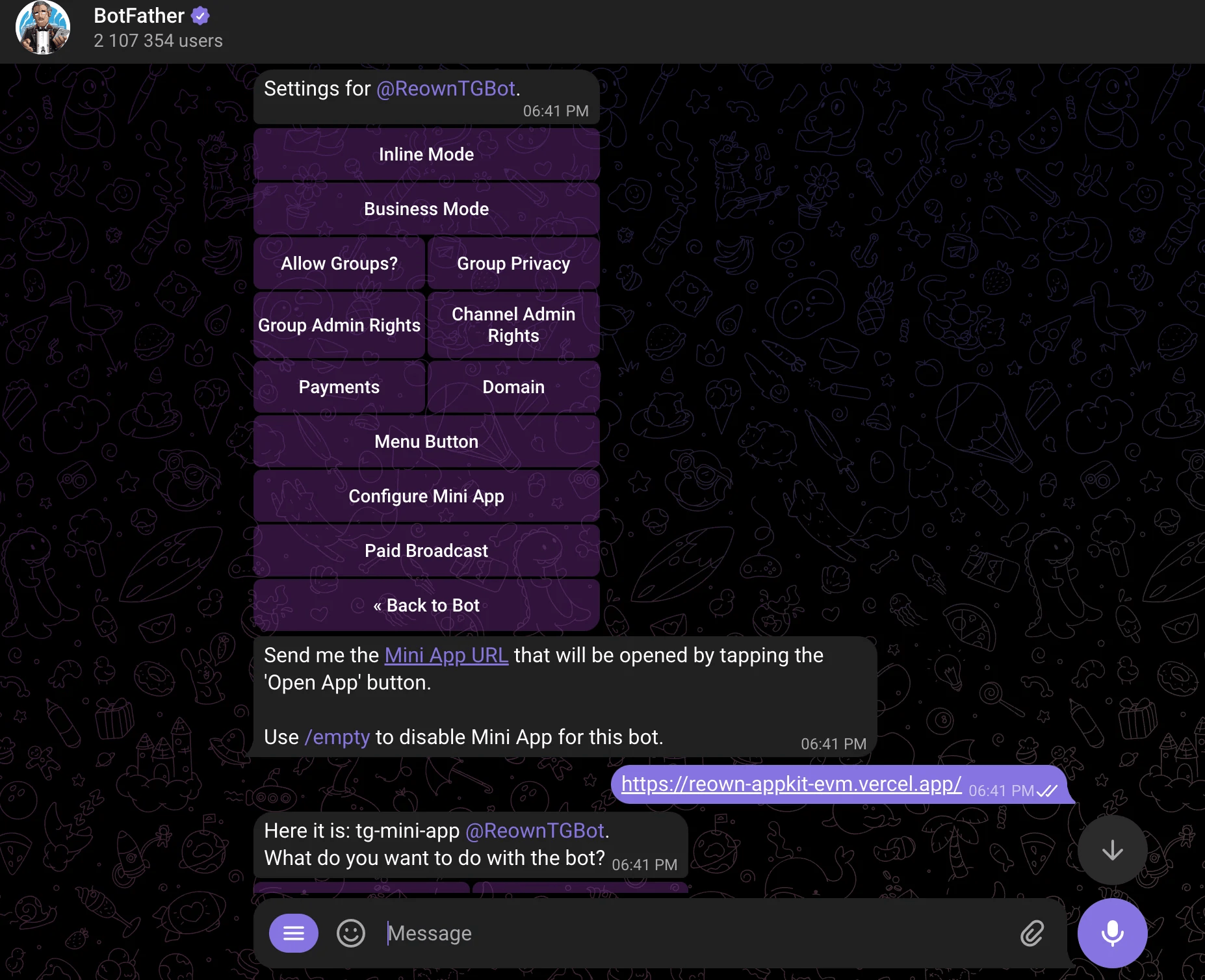
Image C: Step 5
Configure the Telegram Mini App with Reown
Next, you’ll need to configure the URL for your telegram mini-app.
Here’s an example of the URL fully set up; it’s a simple web app that allows users to connect their wallets and switch to any of the pre-configured networks available on the app.
If you’re using Reown AppKit to power wallet interactions on your Web3 app or Telegram mini-app, there’s nothing extra you need to do. Reown AppKit works with Telegram bots and mini-apps right out of the box. As long as you’re running the latest versions of Reown AppKit, no further setup is required.
Not already using the Reown SDK? Quickstart your installation here.
Run your Telegram Mini App
Now, you’re ready to test your telegram mini-app for the first time! Here’s how;
- Open your Telegram bot and click “Start.” The bot will open your mini-app within Telegram. As you can see, the mini-app opened by my Telegram bot is the Web3 app configured with Reown AppKit.
- Next, click the “Connect Wallet” button. This will open the modal that allows you to choose your connection method, either a Web3 wallet, or social or email login.
- Now your wallet should be successfully connected to the mini app!
Conclusion
And that's it. You've now seen how to create a Telegram bot, host a Mini App inside it, and configure that Mini App with Reown so users can connect a wallet directly within Telegram. Because Reown works with Telegram bots and Mini Apps out of the box, the hardest part of bringing a Web3 app into Telegram — a clean, reliable wallet connection inside the webview — is handled for you.
From here, the same integration unlocks the rest of Reown's toolkit: email and social login to onboard users without a wallet, onramps to fund those wallets with fiat, and swaps to let users trade without leaving your app. Want to explore further? Check out the complete AppKit example on this GitHub repo, or get started in the Reown dashboard.